The API Sends a List, the Screen Needs a Tree
Expandable, draggable hierarchies in Vue

A category tree, an org chart, a folder structure: the API hands the browser a flat list of rows with parent ids, and the screen has to show a tree — indented, selectable and, on an admin page, draggable to a new parent.
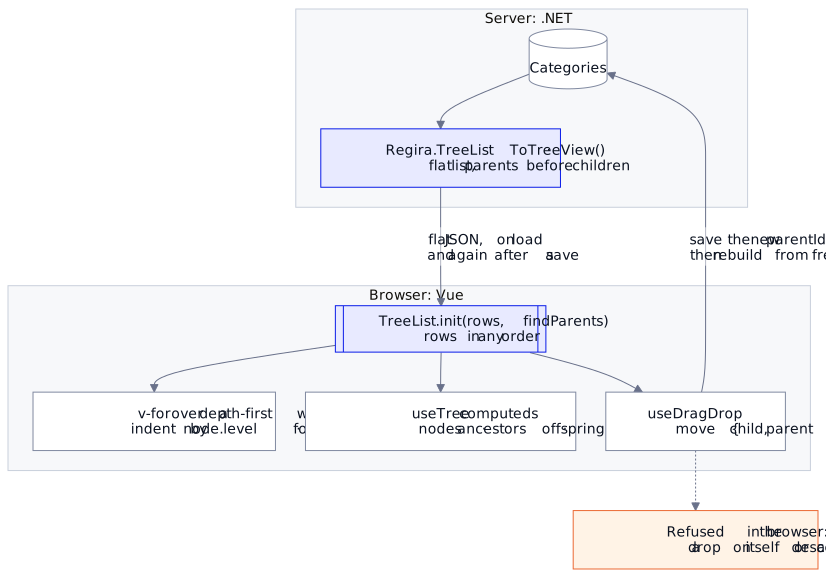
Part 2 left the server returning that list with parents always before their children; this part picks the response up in the browser and turns it back into something a user can expand, select and drag around.
The tools are the front-end counterparts of the .NET pieces: the framework-agnostic TreeList from @regira/modules (plain TypeScript — no Vue, no axios in that module), and a small useTree composable that wraps it in Vue reactivity.
Universal or Regira? Rebuilding a tree from a flat list, folding it and re-parenting a node after a drag are the universal parts, and any tree helper can do them; useTree and useDragDrop are the Regira Modules layer that wires them into Vue.
npm install @regira/modules@6.4.0
import { TreeList, TreeNode } from "@regira/modules/treelist"
A TreeList that is also an array
The design mirrors the .NET Regira.TreeList deliberately. TreeList<T> extends Array<TreeNode<T>>: it is a flat array of every node in the tree, plus a separate roots array for the top level. Each TreeNode<T> exposes value, parent, level (0 for roots) and children as read-only getters.
Being an array with a level on every node is what makes an indented list a single v-for with padding-left driven by node.level, no recursive component — shown once the tree is built below.
Building the tree from a flat response
init(values, findParents) wires a flat list into a hierarchy. You hand it a callback that, given a value and the full candidate list, returns that value's parent(s):
type CategoryRow = { id: number; parentId: number | null; title: string }

const rows: CategoryRow[] = (await axios.get("/categories?pageSize=1000")).data.items
// pageSize capped by the server's MaxPageSize — pick one that covers the whole table

const tree = new TreeList<CategoryRow>().init(
  rows,
  (value, candidates) => candidates.filter((x) => x.id === value.parentId)
)

tree.roots            // top-level categories
tree.getNodes()       // every node, flat
Two properties of init worth pausing on:
- Any order.
initlooks up each value's parents wherever they sit in the list, so the rows need no sorting; a parent that would close a cycle leaves the value as a root instead of looping. - Multi-parent capable.
findParentsreturns an array, so the edge-list shape the/categories/offspringendpoint returns (rows of{ parentId, childId, level, rootId }) builds with the rule the C# repository uses in part 2 — a row's parent is the row that ends where it starts.
Navigation reads exactly like the back end: tree.getRoots(nodes?), tree.getAncestors(nodes?), tree.getOffspring(nodes?), tree.getNodes(valueOrValues?), tree.getValues(nodes?) — all defaulting to every node when called without an argument.
getNodes matches by value equality (node.value === input), so hold on to the object references from the payload rather than reconstructing lookalikes.
Indented and foldable
The array holds the nodes in the order they were added, which puts every parent before its children but not every child under its parent: a Laptops row that arrives after Garden sits after it, not under Computers. So the list walks the roots depth-first, and that walk is also where folding lives — a collapsed node contributes no children:
import { ref } from "vue"

const collapsed = ref(new Set<number>())   // ids of folded nodes

const visible = (nodes: TreeNode<CategoryRow>[]): TreeNode<CategoryRow>[] =>
  nodes.flatMap((n) => [n, ...(collapsed.value.has(n.value.id) ? [] : visible(n.children))])

const toggle = (id: number) =>
  collapsed.value.has(id) ? collapsed.value.delete(id) : collapsed.value.add(id)
<li v-for="node in visible(tree.roots)" :key="node.value.id"
    :style="{ paddingLeft: `${node.level * 16}px` }"
    @click="toggle(node.value.id)">
  {{ node.value.title }}
</li>
A filter panel: useTree
For Vue components, @regira/modules/vue/entities ships a useTree<T>() composable that keeps a TreeList in a ref and derives the interesting sets as computeds:
import { useTree } from "@regira/modules/vue/entities"

const { tree, nodes, ancestors, offspring, family, init } = useTree<Category>()

// values: the items you care about (e.g. current selection)
// data:   the full flat list the tree is built from
init(selectedCategories, allCategories,
  (v, all) => all.filter((x) => x.id === v.parentId))
nodes— the tree nodes for your selectedvalues;ancestors/offspring— everything above / below that selection;family— ancestors + selection + offspring, deduplicated.
That trio is what a filter panel needs: check one category and highlight (or auto-include) its family.
One constraint to know up front: useTree<T> requires T to expose $id — the uniform identifier every entity model in the Regira front-end stack carries (EntityBase-style models) — because that is what nodes and values are matched on. A plain { id, parentId, title } row type won't compile; map it onto your entity models (or add $id) before handing it to the composable. The raw TreeList from the previous section has no such requirement.
Drag to a new parent: useDragDrop
Trees users can edit need two mutations, and TreeList provides both:
remove(node)— removes the node and all its descendants, from the flat array, from its parent's children (or fromroots);move(node, parent?)— detaches a node and re-parents it; a falsyparentmakes it a root again.
The useDragDrop composable handles the drag and decides whether a drop is legal; applying it is yours:
import { useDragDrop, type DragDropEmits } from "@regira/modules/vue/entities"

const emit = defineEmits<DragDropEmits<Category>>()
const { draggingNode, handleDrag, handleDragEnd, handleDrop } = useDragDrop({ emit })
On each row, set draggable="true" and wire @dragstart to handleDrag(node), @dragover.prevent (without it the browser never fires drop), @drop to handleDrop(node) and @dragend to handleDragEnd. Then listen for the move event: it fires with the { child, parent } nodes once a legal drop happens. The composable refuses the illegal cases before that: dropping a node onto itself, and dropping it onto one of its own descendants, which would orphan the subtree into a cycle. That is the client-side mirror of the server's TreeList.IsValidChild check — validate in both places, trust neither alone.
On move, persist the change through your API (in a Regira Entities back end: save the entity with its new parentId, or add/remove a row in the join table for multi-parent models), then call tree.move(child, parent) or rebuild from the response.
move keeps the tree consistent: it re-derives level for the moved subtree and refuses a move under the node itself or one of its descendants. It does not change the node's place in the flat array, which is why the list above walks children rather than the array. After a successful save, rebuilding from the server's rows is still the simplest way to stay in step with the source of truth.
Where the pieces sit
The division of labor across the three parts, which generalizes beyond categories:
| Concern | Where | With what |
|---|---|---|
| Any-depth filtering (subtree conditions inside queries) | Database | Recursive CTE TVFs composed in EF Core |
| Tree shape for one API response | Server memory | Regira.TreeList → ToTreeView() (depth-first) |
| Tree interaction (expand, select, drag) | Browser | @regira/modules/treelist + useTree / useDragDrop |
| Write validation (no cycles) | Both | level cap + IsValidChild server-side; offspring check in handleDrop client-side |
Each layer does the part it is structurally best at, and the contract between them is nothing more exotic than a flat list with parent ids — which is also what makes the pattern easy to test at every seam.
For the large worked example, Westeros, the Iron Throne, and a Model for Complex Relationships puts the same TreeList over houses, oaths and shifting alliances, with the maps to prove it.
Why not a recursive tree component? It is the usual answer, and it works. Here the tree is already a flat array with a level on every node, so indentation is a style binding, and the questions a tree screen asks — what sits above or below this node, is this drop legal — are answered on that same array by useTree and useDragDrop, one object that sees the whole tree.
Docs: @regira/modules on npm · github.com/Regira/Regira-Modules.