From a Flat List to a Tree in One Line of C#
Almost every application grows a hierarchy at some point: categories with subcategories, org charts, folder structures, menus. The database stores it flat — each row names its parent in a ParentId column — while screens and reports need the tree. So sooner or later someone writes the same recursive loop to stitch it back together, plus the same defensive check against a row that accidentally points at its own descendant.
Universal or Regira? The recursive stitch itself is a dozen lines you could write by hand; what the package adds is the node type, with navigation, ordering and cycle handling built in.
One extension method
That loop is worth extracting once and never writing again. With the Regira.TreeList package it is an extension method — dotnet add package Regira.TreeList --version 6.3.2:
using Regira.TreeList;

var people = new[]
{
    new Person { Id = 1, Name = "Alice", ParentId = null },
    new Person { Id = 2, Name = "Bob",   ParentId = 1 },
    new Person { Id = 3, Name = "Carol", ParentId = 1 },
};

var tree = people.ToTreeList(p => people.FirstOrDefault(x => x.Id == p.ParentId));

Console.WriteLine(tree.Roots.Length);            // 1  (Alice)
Console.WriteLine(tree.Roots[0].Children.Count); // 2  (Bob, Carol)

class Person { public int Id { get; set; } public string Name { get; set; } = ""; public int? ParentId { get; set; } }
ToTreeList wraps every item in a TreeNode<T> that knows its Value, Parent, Children and Level (0 for roots). The TreeList<T> itself inherits List<TreeNode<T>>, so the tree stays LINQ-friendly: a flat list of nodes and a hierarchy at the same time.
What you get for free
Navigation. Nodes and node collections get extension methods for walking the tree in any direction — GetAncestors(), GetOffspring(), GetRoots(), GetBrothers() (siblings):
var bob = tree.First(n => n.Value.Name == "Bob");
var ancestors = bob.GetAncestors();   // [Alice] — ordered root → parent
var leaves    = tree.GetBottom();     // all nodes without children
Depth-first ordering. tree.OrderByHierarchy() yields nodes parent-before-children — the order an indented list needs, or a <select> filled with -- prefixes.
Rows no root can reach
A row can end up as its own ancestor, usually after a bulk import. The build still terminates, because the parent-selector overload grows the tree downward from the roots, and a row in a cycle is never reached from any root. A row whose parent is missing from the collection is a different case: the selector above returns null for it, so it simply becomes a root.
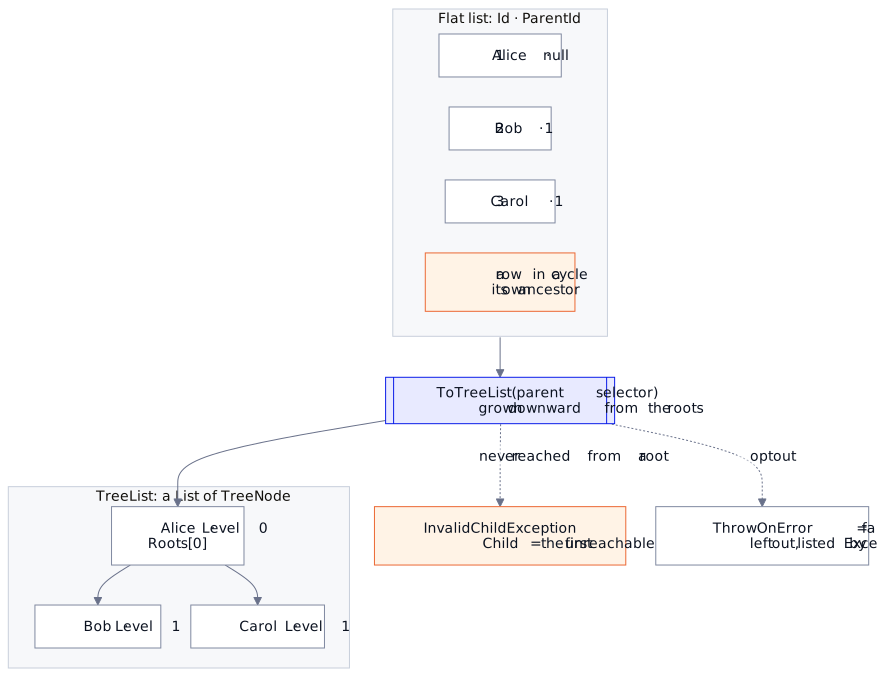
What happens to such rows depends on the overload and on ThrowOnError:
| Build | ThrowOnError |
A row no root reaches | A cycle among reached rows |
|---|---|---|---|
| parent selector | true (default) |
throws InvalidChildException<T>; its Child is the first such row |
cannot occur |
| parent selector | false |
left out; people.Except(tree.Select(n => n.Value)) lists them |
cannot occur |
| children selector | true (default) |
left out, no exception | throws on the add |
| children selector | false |
left out | the repeated row is skipped |
A cycle is reached only when a root you pass sits in one, say a subtree built from a node the user picked, or through manual AddChild calls. The children-selector overload is the one to prefer on large sets when you already know the roots: it asks each node for its children directly instead of testing every row's parent at every node:
var roots   = people.Where(p => p.ParentId == null);
var options = new TreeList<Person>.TreeOptions { ThrowOnError = false };
var tree = people.ToTreeList(roots,
    node => people.Where(p => p.ParentId == node.Value.Id),
    options); // without options, a reached cycle throws
Load flat, wrap once, navigate freely. Everything above runs as-is — grab the sample project (one Program.cs, one dotnet run).
When the hierarchy is too big to load into memory and you want the database to walk it — recursive CTEs mapped into EF Core, composing with your regular filters — that is the next part: How to Query Hierarchies at Any Depth with EF Core.
Docs: regira.github.io/Regira-Packages/src/TreeList — Regira.TreeList is Apache-2.0.
Versions: the cycle behavior described here arrived in 6.2 — InvalidChildException<T> and the ThrowOnError opt-out; the sample pins 6.3.2 and demonstrates both.