Saving, Saved or Failed
One feedback object for every Vue form — is it busy, did it work, what went wrong

Every form that saves something grows the same four pieces of state: is it busy, did it work, what went wrong and which fields. The first implementation is an isSaving ref and a toast(). The second form copies it. By the fifth, the busy flag is a prop drilled two levels down so a button can disable itself, the error is sometimes a string and sometimes an axios exception, and the success toast fires over a form that then navigates away.
@regira/modules (Apache-2.0) folds the four pieces into one object per form. This is its shape, and why each decision in it is there. Everything below runs in the Vite sample (npm install && npm run dev, or npm run demo for the composable alone in Node).
The object
import { useFeedback, toFeedbackError } from "@regira/modules/vue/ui/feedback"

const feedback = useFeedback()   // { autoHideDelay?: number } - default 1500 ms

async function save() {
    feedback.pending("Saving…")
    try {
        await api.save(item)
        feedback.success("Saved")
    } catch (ex: any) {
        // the API's field-error map or its own text if it sent one, else the exception's message
        feedback.fail("Save failed", toFeedbackError(ex) ?? ex.message)
    }
}
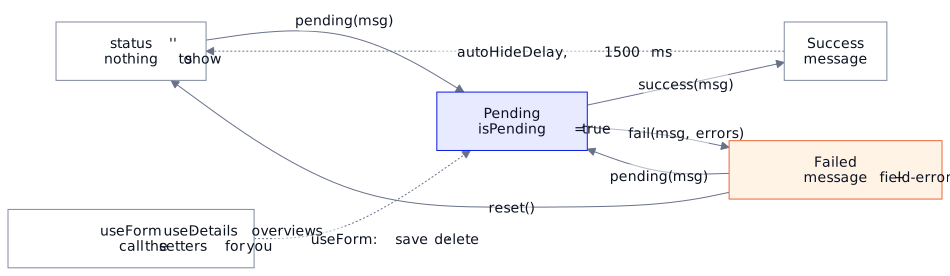
Three setters that each require a message, plus reset(). The object they mutate is what a template reads:
<Feedback :feedback="feedback" />
<input v-model="title" :disabled="feedback.isPending" />
<button :disabled="feedback.isPending">{{ feedback.isPending ? "Saving…" : "Save" }}</button>
No prop-drilled boolean: the form owns the object, and every control that needs the busy flag reads feedback.isPending from it. It is a reactive() object, so you read feedback.status, never .value, in script and template alike; destructuring snapshots the values, so pass the object or toRefs() it. This is the object after each call, straight from the sample's npm run demo:
initial                                    {"status":"","isPending":false,"message":""}
pending('Saving…')                         {"status":"Pending","isPending":true,"message":"Saving…"}
fail(msg, fieldErrors)                     {"status":"Failed","isPending":false,"message":"Save failed","error":{"title":"Required","slug":"Already taken"}}
success('Saved')                           {"status":"Success","isPending":false,"message":"Saved"}
…150 ms later (autoHideDelay=100)          {"status":"","isPending":false,"message":""}
fail() takes the API's error, not the exception
The second parameter of fail(msg, errors) is typed string | Record<string, string | string[]>: a field-error map ({ "title": ["Required"] }) or a plain string. It is not Error: log the exception yourself, and hand the panel what the user can act on. toFeedbackError(ex) extracts that from an axios error: the field errors of a 400 (the errors of the ProblemDetails a Regira Entities API and ASP.NET's model binding answer with, { "errors": { "Title": ["Required"] } }, or a bare map) with each key starting lower-case, else the server's detail or message, else undefined, hence the ?? ex.message. The shipped <ErrorSummary> renders a map as a field list, each field headed by its label (dueDate reads "Due date"). A message or field name that is a key in your useLang translations shows translated; setErrorTranslator plugs in another i18n library. A string is folded into the message, first line only, so a stack trace never lands in a panel:
fail(msg, 'Network Error\nat xhr.js:1:1') {"status":"Failed","isPending":false,"message":"Save failed: Network Error","error":{"title":"Required","slug":"Already taken"}}
That line also shows a trap: a fail() with a string keeps the previous error map. In a save flow pending() runs first and clears it; call reset() if one failure can follow another without a pending() between them.
Success fades, failure stays
success() schedules a reset() after autoHideDelay (1500 ms unless you pass another; 0 disables it). fail() never auto-hides, and fail() or pending() cancels the reset a success left pending, so a refusal right after a success stays. A user who did not look at the screen for two seconds should still find out the save failed; the same user does not need a green bar to stay until they dismiss it.
The panel, or your own
<Feedback :feedback="…"> renders whichever of its three children the status calls for — Pending, Success, ErrorSummary — each replaceable through a slot (#pending, #success, #error, #close-button). If the look is wrong for your app, the contract is exported (FeedbackProps, FeedbackEmits, FeedbackSlots): write a component against the same object and nothing upstream changes.
Three forms you actually have
The edit form with inline field errors. The panel's summary is fine; the input turning red is better. The same map serves both — read one key per field:
import { fieldMessages } from "@regira/modules/vue/ui/feedback"

function fieldError(name: string): string {
    return fieldMessages(feedback.error, name).join(" ")   // every message of the field, "" when none
}
<input v-model="title" class="form-control" :class="{ 'is-invalid': fieldError('title') }" />
<div class="invalid-feedback">{{ fieldError('title') }}</div>
fieldMessages reads one field as an array, whether the map holds a string or a list, and empty when the error is text or unset; a field with two broken rules shows both. Because toFeedbackError starts every key lower-case, fieldError('title') also finds the server's Title. With the messages at the inputs, <Feedback :feedback="feedback" hide-field-errors /> keeps the panel to the message and the errors no one field owns, so nothing shows twice.
Save, then navigate. After a successful create you usually leave the form. useForm's handleSubmit does not re-throw on failure, so the line after await runs either way — branch on the object, not on the absence of an exception:
import { FeedbackStatus } from "@regira/modules/vue/ui/feedback"

await handleSubmit()
if (feedback.status === FeedbackStatus.success) router.push({ name: "tickets" })
Delete from a list row. The row has no panel; the list does. Give the list one useFeedback() and let every row's delete report into it — including the 409 a still-referenced row answers with and a validator's 400, which Edit Forms That Survive Reality walks through. The rows stay put, and the refusal is on screen.
The one panel a handler can't own
Some feedback has no form. "Added to cart" from a product card; "Copied" from a button in a table row. For those the plugin installs one app-wide instance, and useAppFeedback() hands it to any component:
// main.ts
import { plugin as feedbackPlugin } from "@regira/modules/vue/ui/feedback"
createApp(App).use(feedbackPlugin, { autoHideDelay: 2500 })

// anywhere
import { useAppFeedback } from "@regira/modules/vue/ui/feedback"
const appFeedback = useAppFeedback()
appFeedback.success("Added to cart")
The shell renders <Feedback :feedback="appFeedback" /> once: a local instance per form, one global instance per app.
Where it comes from
This object is what the library's own composables hand back: useForm, useDetails and the overview composables each return a feedback: FeedbackOut, already driven by their save, load and delete paths. If you use those, you never call the setters; you bind the object.
Why not an isSaving ref and a toast()? Because that is this object's first draft, and the fifth form's copy is where the busy flag gets drilled, the error type drifts and the success toast outlives the form. The object is small enough to adopt on its own — the sample is all of it — and adopting it costs less than the next copy of isSaving.
Docs: Regira Modules — UI.
Versions: the sample pins @regira/modules 6.5.0, which adds fieldMessages, translated messages, field labels in the summary and hideFieldErrors, and keeps a success's timer from clearing the failure that follows it; since 6.1.0, useFeedback() returns a reactive() object; since 6.1.2 useForm's handleSubmit no longer re-throws on failure.