What Happens When a Simple App Brief Gets Complicated?
The six-line brief gets an agent to a running app because every bullet in it has a one-word answer in the framework: entity, relation, filter, sort. Real briefs do not stop there. The second version of a shopping-list app wants sign-in, lists shared between people, a photo on each article, "suggest what I usually buy", and a phone that keeps working in the basement of the supermarket.
Each of those is a different kind of ask, and the useful question before pasting the brief into an agent is which kind. Is there a blueprint the documentation hands over whole? A pattern the agent has to compose? Or nothing — a feature the framework does not have, which the agent must either build or tell you it cannot?
This post takes one such brief apart. It is a plan, not a report: the brief below has not been run through an agent, and every mapping is read from the documentation the MCP server serves.
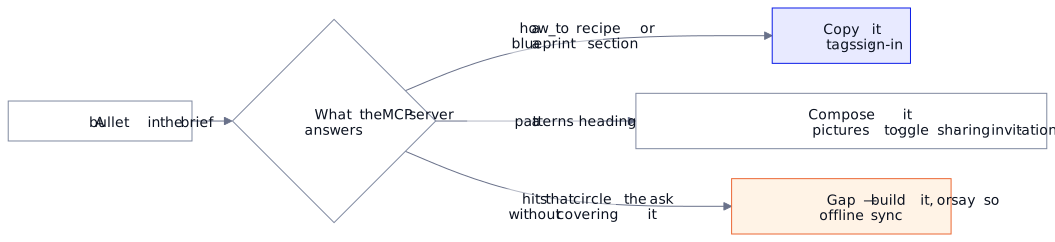
Universal or Regira? Sorting a brief into copy, compose and gap before handing it over works with any framework and any agent, and so does cutting it into steps that can each be run and rejected. The blueprints, patterns and slot costs below are Regira Entities and @regira/modules, as the documentation describes them.
The brief, in three steps
Create an app AdvancedShopMate (back-end & front-end), which offers services to manage shopping lists.

Use a modern mobile-first design with large touch-friendly controls, swipe actions and a minimal interface.

Step 1
* Shoppers can manage multiple shopping lists.
* Shopping Lists contain Articles that can be sorted manually or alphabetically.
* Articles can belong to multiple Categories and can be filtered using categories and text search.
* Articles can be linked to one or more shops.
* Articles can have multiple tags (e.g. gluten-free).
* Categories support parent/child relationships.
* Shops, Shopping Lists, Categories and Articles can be fully managed.

Step 2
* Articles can be activated or deactivated on a Shopping List.
* Shoppers authenticate and initially only see their own Shopping Lists.
* Shoppers can invite other people to share Shopping Lists.
* Shared Shopping Lists can be edited by multiple shoppers.

Step 3
* Articles can contain pictures.
* Frequently purchased Articles should be suggested automatically.
* The application should support offline usage and synchronize changes when reconnecting.
Why three steps and not one list? A step is something you can run, click through and reject before the next one builds on it — the same reason the golden path has checkpoints. Run each step as its own agent session in the same folder: an agent on an existing project reads the .csproj and the installed packages first, so step 2 starts from step 1's code, and a step you did not like is a git checkout.
Step 1 — the six-line brief, grown
Nothing in step 1 is new in kind; it is the first post's brief with more relations. What changes is the budget arithmetic, so it is worth doing once by hand, the way the agent will in phase 0.
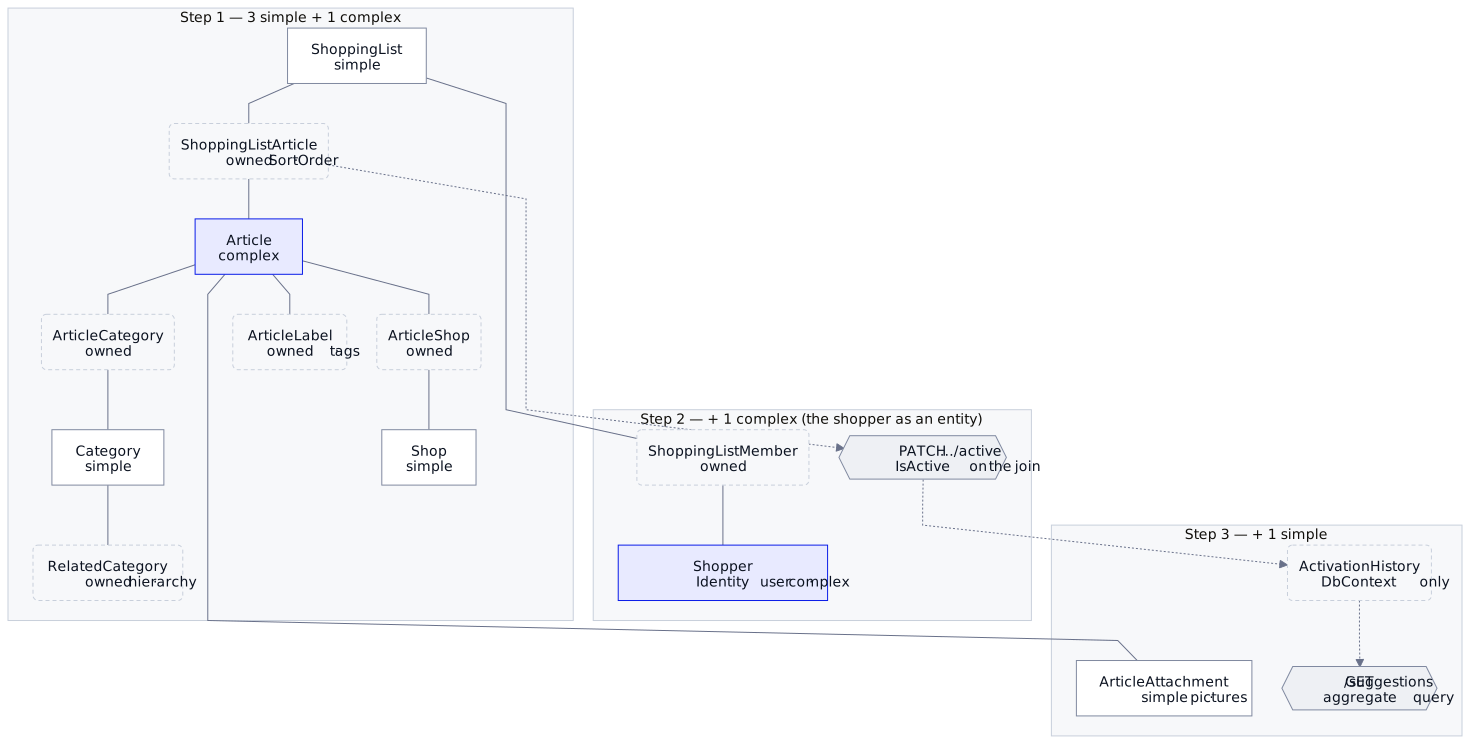
Shop, ShoppingList, Category and Article are managed on their own pages, so four registrations. Article is the one with a typed sort and typed includes, which makes it complex; ?q= and category filters work on simple entities too, so the other three are simple. Everything else in the step is an owned collection and costs nothing:
- article–category and article–shop are many-to-many joins, synced by the parent's
e.Related(); - the category hierarchy is the self-referencing many-to-many ShopMate already has;
- "articles on a shopping list, in manual order" is a
ShoppingListArticlejoin with anISortableSortOrder, owned by the list; - tags have a blueprint of their own, EntityLabels — free-form labels on any entity, searchable through its
?q=— at 0 slots.
Step 1 lands at 3 simple + 1 complex, out of 5 + 2. The SPA is the scaffold plus a slice per registration, with a hand-written mobile tab bar for navigation, as ShopMate's agent wrote it. The checkpoint: change only an article's title, and its categories, shops and tags are all still there.
One decision belongs in step 1 even though its bullet is in step 2. The app shell comes from scaffold.mjs --shell with or without sign-in (--no-auth). Adding sign-in later means regenerating the shell with --force, which resets what you changed in it (a --no-auth shell lacks the auth plugin and sign-in UI, the permissions file, the /401 page and their texts), and restoring every slice's onAuthenticated reload hook by hand (not yet run). If you know step 2 is coming, say so in step 1: "sign-in comes in the next step; scaffold the auth shell now."
Step 2 — the framework gets tested
Activate or deactivate an article on a list. A pattern the docs single out because it goes wrong silently: owned children that are both sortable and individually togglable. The order is saved with the list; the active flag changes one row and gets its own PATCH route. The trap is that a list save rewrites whole rows, so every reorder resets the flag unless a parent-level Prepare hook, registered before Related(), restores it from the store. An agent that reads the pattern writes that hook; one that guesses ships the bug, and step 2's checkpoint catches it.
Shoppers authenticate. This one is a copy. The guide picks AddJwtAuthentication with AddRefreshTokens for "a SPA or mobile client against your own user table", and the how_to recipe Roles end-to-end: Identity → JWT → SPA is the full chain — opening with the fact that the default Identity wiring emits no role claims. On the SPA side, the auth plugin's one trap is fetching before the stored token is validated. If you want the shopper to be an entity — a profile page, an admin list — Identity users as framework entities is a blueprint at 1 complex slot.
Only your own lists, then shared ones. Here the framework has the shape but not the exact piece. The Multi-tenancy blueprint isolates rows by a claim in the caller's credential; sharing is the same mechanism keyed on a ShoppingListMember join (owned by the list, 0 slots) — a composition, and where an agent earns its keep. The toggle's PATCH works on the DbContext directly (not yet run), and so will step 3's suggestions query: both skip that filter and need the check written in.
"Invite other people" is a domain action on an entity resource: POST /shopping-lists/{id}/invitations on a second controller, so its guard stays off every ordinary write. Whether the invitee must already exist or gets an e-mail is a product question the brief leaves open; expect the agent to ask, or to pick the simpler one and say so in its README.
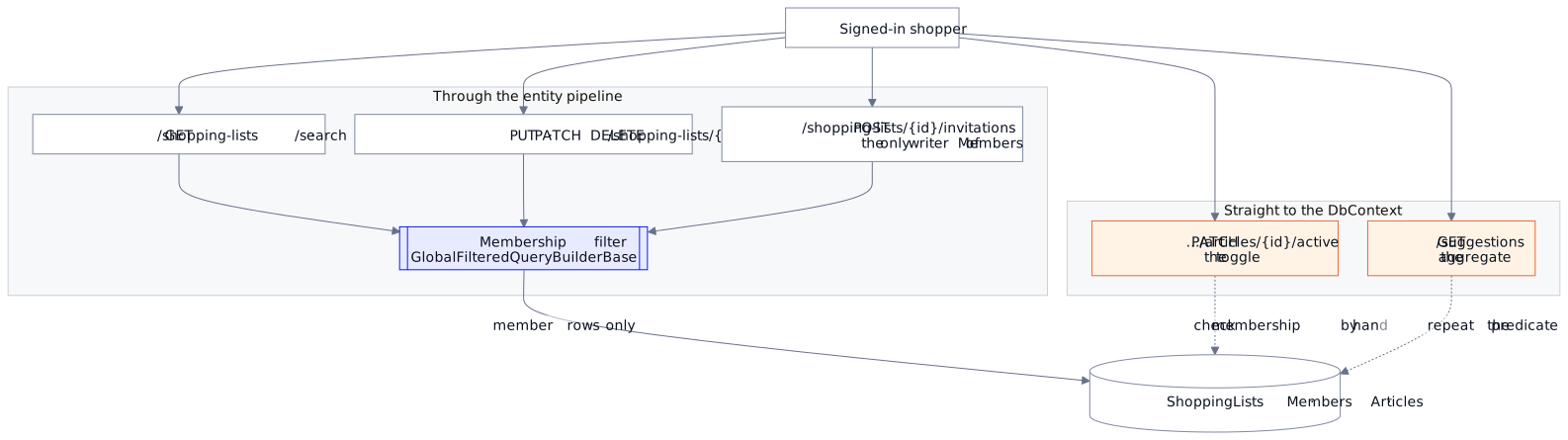
Edited by multiple shoppers. Membership settles who may edit; what happens when two of them edit at once, the brief does not say. The guide adds conflict handling only when asked or when several users edit the same rows, and a shared list is that case, so expect the agent to add it or to ask. Either way, check that a stale save is refused with a 409 the screen reports — When Two People Edit the Same Record is what it builds.
Budget after step 2: 3 simple + 2 complex if the user is an entity, 3 + 1 if not — provided invitations live as owned rows or plain DbContext writes; a registration of their own would be +1 simple. Checkpoint: two accounts, one shared list, one private list; each account sees exactly the lists it should, in the list and on a direct URL; a reorder on the shared list leaves every active flag alone; and a PATCH on a row of a list you are not a member of is refused.
Step 3 — one built-in, one query, one gap
Pictures on articles are attachments: WithAttachments(...) once and HasAttachments on Article, at one extra simple slot per owner for its join entity. The SPA side is the shared attachments slice, scaffold.mjs Article --attachments, which on an existing slice prints the edits to make by hand (not yet run).
Pictures come with a decision the brief does not make: are they public? An <img src> carries no bearer token, so on a secured API every photo renders as a 401 until the download actions are re-exposed anonymously — public (anonymous) attachment downloads is its own pattern, and uploads and deletes stay guarded. Articles are not membership-scoped, so their pictures need no filter; a picture on a list would, because an owner's row scope does not reach its attachments (One Database, Many Customers, No Leaks).
Suggest frequently purchased articles. Not an entity, so zero slots: the cross-entity aggregate pattern, a plain controller querying the DbContext — "articles activated most often in the last ninety days, by shopper" — and a small SPA panel that calls it. The catch is that an activation has to be recorded to be counted: step 2's toggle needs a history row per activation, a step-3 change to a step-2 design that mentioning suggestions in step 2 would have saved.
Offline use with sync. This is the gap, and better known before the agent meets it. @regira/modules ships an online flag — vue/online, one reactive isOnline that follows the browser — and nothing else: no offline store, no change queue, no sync. A search will not say so by coming back empty: search_docs("offline sync") returns hundreds of hits that circle the ask.
A well-behaved agent reads them, sees that nothing stores or replays anything, and either builds the queue itself (a service worker for the shell, IndexedDB for pending saves, replay on reconnect) or tells you what it would take (not yet run). Either is a good outcome; a bad one is a useOfflineSync that never existed. If offline is a must-have, decide whether it is worth an afternoon of hand-written code on top of the generated app, and say so in the brief.
Budget after step 3: 4 simple + 2 complex with the shopper as an entity, one simple slot short of the free tier's ceiling; 4 + 1 without. The attachment join is the one new slot.
Scaling up after the first run
The three steps assume you know the roadmap. Usually you do not: you generate the six-line version, use it for a week, and the next bullet arrives then. It works the same way — a new session in the same folder, one feature per prompt — but once the app exists, five things change.
- Ask for a change, not an app. "Add pictures to articles", not the whole brief again. The front-end generator leaves your work alone: a new entity gets a new slice, and an existing one gets only what was asked unless you tell it to regenerate (
--overwrite-slice). - The database stops being disposable. The generated API creates its SQLite database at start-up with
EnsureCreated(), which never changes a database that already exists; after a model change,--ResetDatabase=truerebuilds it with fresh seed data. Fine for a demo, not once real lists live in it. The guide adds EF Core migrations only when asked, so ask before the first model change on data you want to keep. - SQLite is where you start, not where you stay. A file beside the API suits a demo and a handful of users; a shared server with backups usually means SQL Server (or Azure SQL), PostgreSQL or MySQL. In code that is one line: the
DbContextregistration names only the provider, soUseSqlitebecomesUseSqlServer,UseNpgsqlorUseMySql, and the framework wires the rest. The work is around that line:- migrations are generated per provider, so make the switch and the first migration one session, against the target database;
- a real server enforces what SQLite let slide: foreign keys (SQLite ignores them unless its connection string turns them on) and, on SQL Server, a second cascade path to the same table — refused at the first migration, a case the docs name with its fix;
- hand-written SQL is dialect: a blueprint's recursive functions are written for SQL Server, and PostgreSQL needs its own;
- nothing in EF Core copies rows between providers: demo data is seeded again, real data needs a one-off copy, checked afterwards with a count per table.
- The budget runs out. Step 3's app ends one slot short of the free tier, so count before you prompt. The two changes that free a slot, and where a paid key goes, are in the supporting article under A domain over the free tier.
- The project splits later than you would think. The guide keeps one project with a folder per entity until the domain is past the free tier and something must share it: a second host such as a worker, a second
DbContext, several domains, or a second application. Then it splits by technical layer — a move of files, not a rewrite. Before that, a split only adds project files.
What this brief teaches about briefs
Three things carry over to any second brief:
- Let the server sort each bullet. A
how_toor a blueprint is a copy, a patterns heading a composition, and hits that circle the ask without covering it a gap. - Put scaffold decisions first. Sign-in, attachments and whether users are entities belong in the earliest step that can know them; the generator will not regenerate over your edits without discarding them.
- Record facts early. A feature is often a query over a fact an earlier step has to store: suggestions need history, and history needs a row on every toggle.
The brief above is yours to run; the samples repository holds the step-1-sized ShopMate it grows from. What to read once the agent hands the result over is the next post.
Docs: the blueprints, patterns and guides named above, all served by mcp.regira.com.