List Screens That Survive the Back Button
Fast typists, slow servers and shareable URLs, handled by Vue composables

Most business applications are, by volume, list screens: a grid of vehicles, invoices or products, a search box, a filter panel, paging, row actions. It is the screen users live in all day, and it hides more traps than any form: the results of an older search replacing the one just typed, an error message over data that loaded fine, a row that vanishes although the delete failed, a back button that loses the user's filters.
The overview layer of the @regira/modules entities client — a Vue 3 + Pinia CRUD client that mirrors a Regira.Entities back end — answers each of those traps with one rule.
Universal or Regira? The five rules this post ends on are plain Vue 3 and a router: ref(), watch and a counter build them. The composables are the wiring to one back end: the /search endpoint that returns a count.
The cast, smallest to largest:
| Composable | Role |
|---|---|
useOverviewCore |
Shared state + save/remove plumbing (no fetching) |
useSearchView |
Core + counted, paged fetching via GET /search |
useListView |
Core + plain list fetching via GET / |
useRouteOverview |
Syncs search state ⇄ URL query, refetches on navigation |
useFilter |
Filter panel mechanics (emit/reset/active detection) |
A view composes two or three of them; none of them knows about your components.
The core: state, and a split between apply and handle
useOverviewCore({ service, searchObject, defaultPageSize }) owns the refs every list needs — searchObject, pagingInfo, items, itemsCount, isLoading and a feedback object for the banners. items and itemsCount start as undefined, not []: not fetched yet is a different screen from fetched, empty, so a template guards the lazy refs (v-for="x in items ?? []") and shows a skeleton instead of a flash of "no results".
The naming convention is the part worth copying. apply* talks to the server; handle* mutates the local list. applySave and applyRemove never throw — an unhandled rejection in @click gives the user nothing — but report through feedback and return the server's verdict, so the local mutation waits for it:
if (await applyRemove(item)) handleRemove(item) // the row leaves the screen only when it left the database
A delete the server refuses stays in the list next to its failure message instead of vanishing until the next refetch. What that refusal looks like from the edit form's side is in the useForm deep dive.
Two fetch shapes: useSearchView and useListView
Both extend the core with a fetch handler; the difference is the endpoint. A Regira.Entities controller exposes two on every entity: GET /{entities} returns { items }, and GET /{entities}/search returns { items, count }, where count is the total of matching rows ignoring paging (the full endpoint table is in the filtering series opener). useSearchView targets /search and is the one to use whenever there is a pager; useListView targets the plain list and derives itemsCount from items.length — fine for a short, unpaged list, meaningless for a pager.
Both handlers send the current search object merged with the current paging, and searchHandler(true) forces page = 1 for a fresh filter.
Fast typists: one request per pause
Both composables also return a debounced handler (debouncedSearchHandler / debouncedListHandler): a promise-returning debounce, 250 ms by default (debounceDelay), so a burst of keystrokes ends in one handler run and every caller that waited resolves with that one result. Typing "volvo" at speed produces one request instead of five. The debounced handler calls the fetcher directly, so it belongs on a search input only where no route overview runs. With useRouteOverview (below), debounce the URL update instead and let the route watcher fetch, as it does for every other trigger; the wiring at the end shows the line.
A debounce does not solve overlap on its own: a user who pauses, types on and pauses again has issued two real requests, and the second can land before the first. The guard below covers that.
The race you will eventually hit: latest wins
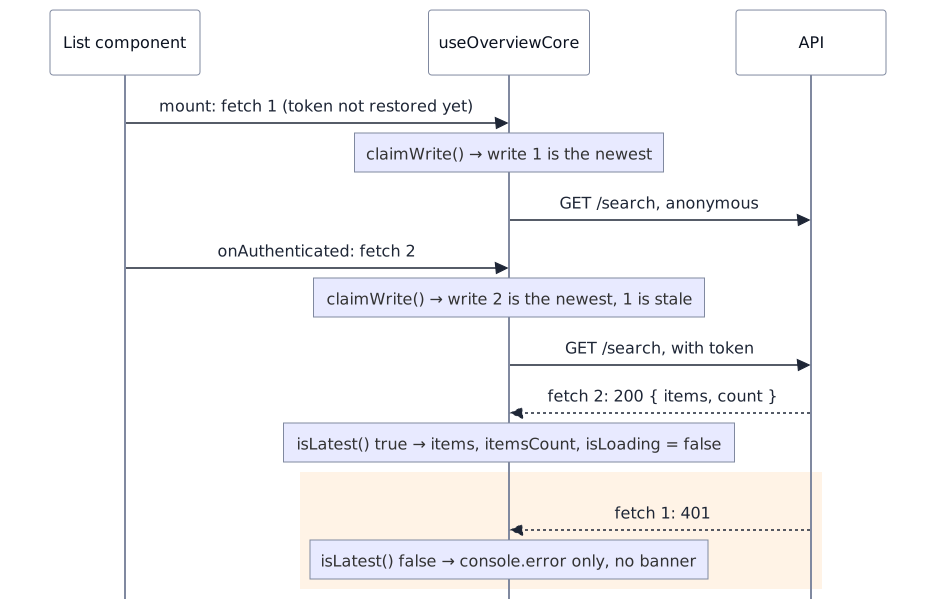
A user hard-reloads, or deep-links into, a list page in an authenticated SPA:
- The component mounts and
useRouteOverviewfires the initial fetch. The auth token is still being restored, so this request goes out anonymous and will come back401. - Milliseconds later the token lands and the
onAuthenticatedhook fires a second fetch. This one succeeds.
Nothing guarantees their completion order. In the common bad ordering the retry succeeds first and renders rows; then the 401 lands and its catch paints a failure banner — which, unlike a success toast, does not auto-hide — over a perfectly loaded list. Users see an error on top of their data and, reasonably, file a bug.
The fix is a monotonically increasing counter: only the newest call may write. The core mints it and hands each caller a function that answers "am I still the newest?":
// useOverviewCore — one counter for everything that writes the shared state
let latestWriteId = 0
function claimWrite() {
    const writeId = ++latestWriteId
    return () => writeId === latestWriteId
}
Every handler claims a write when it starts and gates each write on it — data, error feedback, even the loading flag:
async function searchHandler(resetPaging = false): Promise<void> {
    const isLatest = claimWrite()
    isLoading.value = true
    try {
        feedback.reset()
        const { items: data, count } = await service.search(so)
        if (!isLatest()) return                       // superseded — drop silently
        items.value = data
        itemsCount.value = count
    } catch (ex) {
        console.error("fetching failed", { ex })
        if (isLatest()) feedback.fail("fetching data failed", ...)   // a stale failure logs, but never paints
    } finally {
        if (isLatest()) isLoading.value = false
    }
}
The counter is the core's, shared by searchHandler, listHandler, applySave and applyRemove: a save that settles while a filter change is still fetching cannot clear the spinner the fetch owns, and a stale search cannot paint over a newer result. Only the shared state is gated — applySave and applyRemove still return what the server said. AbortController reaches a similar result by canceling the older request instead of ignoring it, at the price of special-casing the abort error on the failure path.
The URL is the filter state
The last piece, useRouteOverview, takes a position that pays off across the whole app: the route query — ?q=volvo&brandId=3&page=2 — is the canonical copy of the list's search state. The component's refs are a working copy.
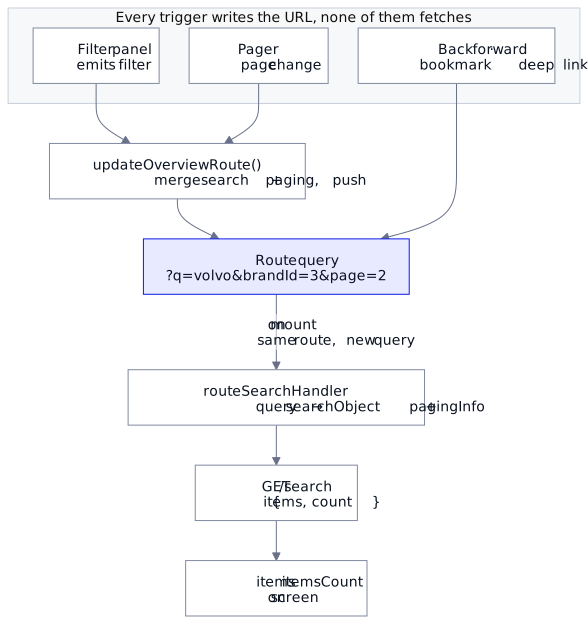
State → URL. After the user changes a filter, updateOverviewRoute(resetPaging?) merges the search object and paging into the current route's query and pushes it, dropping null/undefined values, $-prefixed client-only keys and page when it is 1 — a minimal, shareable URL.
URL → state. On mount, and on every route change within the same named route, routeSearchHandler parses the query back into { searchObject, pagingInfo } and runs the fetch:
const routeWatcher = watch(router.currentRoute, async (newRoute, oldRoute) => {
    if (newRoute.name === oldRoute.name) {   // same page, new query → refetch
        await routeSearchHandler()
    }
})
onMounted(routeSearchHandler)
Deep links, back and forward — every filter change is a history entry, so the back button is the undo stack for filters — and refresh all fall out of this loop. So does the architectural property: user interactions never call the fetcher. They update the URL, and the watcher fetches. The filter panel does not fetch either: useFilter only emits, and the overview answers its filter event with updateOverviewRoute(true). Search box, pager, filter panel, back button and deep link converge on one code path, which is why they cannot disagree.
Putting it together: every event, one path
A complete overview component, reduced to its wiring. The composables come from the entities client (npm i @regira/modules@6.4.0, imports from @regira/modules/vue/entities); service is your EntityServiceBase subclass for the entity, and its IConfig — api, searchUrl, defaultPageSize — is where the endpoints above are configured. A Pinia store is a convenient place to pool one instance per entity:
import { useSearchView, useRouteOverview } from "@regira/modules/vue/entities"
import { debounceToPromise } from "@regira/modules/utilities/promise-utility"

const service = useVehicleStore().service       // pooled service from the Pinia store

const {
    searchObject, pagingInfo, items, itemsCount,
    isLoading, feedback,
    searchHandler, applySave, applyRemove, handleSave, handleRemove,
} = useSearchView<Vehicle, VehicleSearchObject>({
    service,
    searchObject: new VehicleSearchObject(),
    defaultPageSize: config.defaultPageSize,
})

const { updateOverviewRoute } = useRouteOverview({
    searchObject, pagingInfo,
    defaultPageSize: config.defaultPageSize,
    handler: searchHandler,
})

// filter panel emits `filter` → push URL (reset to page 1) → watcher refetches
function onFilter() { updateOverviewRoute(true) }
// search box @input → push URL once the typing pauses (one history entry per pause) → watcher refetches
const onSearchInput = debounceToPromise(() => updateOverviewRoute(true), 250)
// pager emits page change → push URL → watcher refetches
function onPage(page: number) { pagingInfo.value = { ...pagingInfo.value, page }; updateOverviewRoute() }
// row deleted in a modal → server first, then the list
async function onRemove(item: Vehicle) { if (await applyRemove(item)) handleRemove(item) }
None of these handlers fetches: the search box, the filter panel and the pager write the URL and leave the rest to the watcher; the delete asks the server first and touches the list only on a yes.
What your API must provide. Three things, all met above. A
GET /{entities}/searchendpoint that returns{ items, count }with the count ignoring paging, so a pager has a total to work from. A409 Conflict, or a validator's400, with a message when a delete is refused, soapplyRemovecan answerfalseinstead of dropping the row. And a page-size clamp enforced at the HTTP boundary (pageSize: 0means "everything" on the client; the server'sMaxPageSizestill caps it), so no client can escape it. A Regira.Entities controller exposes all three; on another back end they are the contract to build.
The transferable checklist
Strip away the library and five rules remain, for any list screen in any framework:
- Separate server calls from local mutations, and make the local mutation wait for the server's verdict — above all for deletes.
undefined≠ empty. Model not yet fetched explicitly, and guard the template.- Latest wins, enforced. Any screen that can issue overlapping reads needs a supersession guard on every write — data, errors and spinners alike.
- Count where you page. A pager driven by
items.lengthis quietly wrong; use an endpoint that returns the total. - Make the URL canonical. Filters, paging and search belong in the query string, and the fetch is a reaction to the URL changing — one path to the server, shared by every trigger.
Why not TanStack Query or Pinia Colada? If your screens are mostly reads and you want caching, background refetching and request de-duplication, use one of them — the supersession counter in rule 3 is, in essence, what they do internally. The comparison is not like for like, though: these composables are a CRUD client for one specific back end — the URL as filter state, the count-where-you-page endpoint, the delete that waits for the server's verdict — not a caching layer. Pairing the two is reasonable; replacing one with the other is not.
The form this overview opens has its own composable, useForm, with its own decisions about cancel, save, delete and restore: the next deep dive.