Test on Disk, Ship to the Cloud
File storage you can swap in configuration

Every application ends up storing files: uploads, scanned invoices, generated PDFs. Where those files live is usually decided the day the first such feature is written, by whichever API was closest to hand, and from then on every environment inherits that decision, unit tests included. Moving the files somewhere else later means touching every place that reads or writes one.
File storage is a textbook seam. Put one interface in front of it, and where files live becomes a per-environment setting instead of a line of code: a developer works on a local folder, tests run without a cloud account, production uses Azure, and moving to another store later is a configuration change. Application code talks to the interface, and each environment registers the implementation it wants.
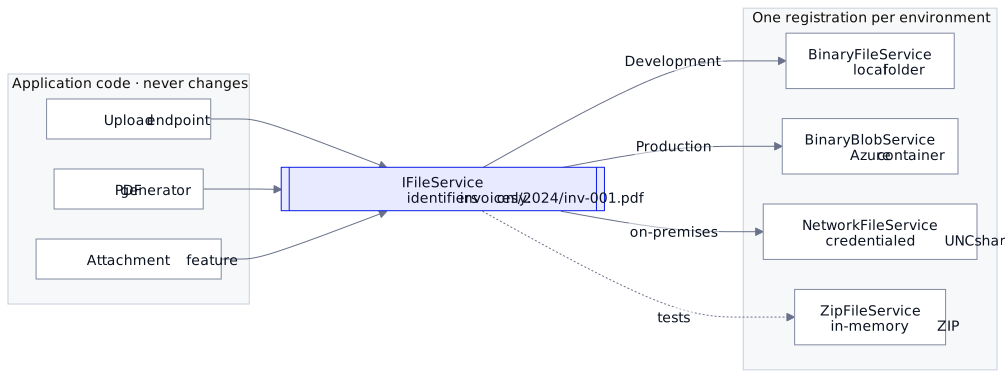
In existing code, the grep that finds the decision is BlobServiceClient (or System.IO.File) referenced from application code. Neither is bad in itself; the problem is that application code made the choice. The interface that takes it back:
public interface IFileService
{
    Task<bool>    Exists(string identifier);
    Task<Stream?> GetStream(string identifier);
    Task<string>  Save(string identifier, Stream stream, string? contentType = null);
    Task          Delete(string identifier);
    Task<IEnumerable<string>> List(FileSearchObject? so = null);
    // ...
}
That's the core of Regira.IO.Storage. What makes the implementations truly interchangeable is that every method speaks in identifiers — paths relative to the service's root, like invoices/2024/inv-001.pdf — never absolute paths or URLs. Application code stores and passes identifiers; only the implementation knows what they resolve to.
Universal or Regira? The seam — one interface, identifiers instead of paths, the backend chosen in configuration — is a pattern you can write in an afternoon. Regira.IO.Storage is one implementation of it, with the disk, Azure, network-share and ZIP backends below.
The interface and the disk implementation are one package, Azure is a second:
dotnet add package Regira.IO.Storage --version 6.5.0
dotnet add package Regira.IO.Storage.Azure --version 6.5.0
Development registers the local disk:
services.AddSingleton<IFileService>(_ =>
    new BinaryFileService(new FileSystemOptions { RootFolder = "/var/app/uploads" }));
Production swaps the registration, and nothing else:
var communicator = new AzureCommunicator(new AzureOptions
{
    ConnectionString = configuration["Storage:ConnectionString"],
    ContainerName    = "uploads"
});
services.AddSingleton<IFileService>(_ => new BinaryBlobService(communicator));
Every consumer — upload endpoints, PDF generators, the attachment feature of your entity framework — keeps calling Save("invoices/2024/inv-001.pdf", stream) and never learns the difference. Blob names encode a "folder" structure just fine, so the identifiers keep it intact across backends.
The four environments, and the implementation for each:
- A developer laptop —
BinaryFileServiceon a local folder, the registration above. - Production —
BinaryBlobServiceon an Azure container. - An on-premises share —
NetworkFileService, for credentialed UNC paths on Windows; elsewhere, mount the share and pointBinaryFileServiceat it. - Tests —
ZipFileServiceon an in-memory ZIP archive: point the code at it and assert on its entries, written with/on every OS; no disk I/O at all.
Two habits to go with the seam:
- Bind options from configuration, so the backend really is an environment decision:
FileSystemOptionslocally,AzureOptionsin the cloud, both plain config sections. - Store identifiers in your database, not absolute URIs.
GetAbsoluteUri(identifier)exists for the moment you need a real address; the stored key stays portable, so migrating your file store later is a copy job rather than a data migration. And when that copy job comes, it's the same interface on both ends — the second part of this series builds a small config-driven sync tool that way.
Uploads add one rule: the name decides the type. The client chooses both the file name and the declared type of an upload, and a .png declared text/html, served back with that type, is a web page running script on your site. OWASP's File Upload Cheat Sheet has the remedy: type a file by its name, and serve it so it cannot run code. A folder stores no type anyway, so the name is also the one type every backend can give back. Regira.Web (dotnet add package Regira.Web --version 6.5.0) has a call for each half, here in a controller whose files is the IFileService above:
[HttpPost]
public async Task<IActionResult> Upload(IFormFile file)
{
    var upload = file.ToNamedFile();   // typed by its name; file.ContentType is never read
    var identifier = $"{Guid.NewGuid():N}{Path.GetExtension(upload.FileName)}";
    await files.Save(identifier, upload.GetBytes()!, upload.ContentType);
    return Ok(new { identifier, upload.ContentType });
}

[HttpGet("{identifier}")]
public async Task<IActionResult> Download(string identifier)
{
    var bytes = await files.GetBytes(identifier);
    if (bytes == null) return NotFound();
    var file = bytes.ToBinaryFile(ContentTypeUtility.GetContentType(identifier));
    file.FileName = identifier;
    return this.File(file);
}
this.File adds X-Content-Type-Options: nosniff, so the browser keeps the type it is given, and on everything but a PDF Content-Security-Policy: sandbox, so even an .html file opens without script or your site's cookies. A blob link skips Download, so on Azure the stored type is what the browser gets: pass upload.ContentType or nothing, never IFormFile.ContentType, and keep such links off subdomains that share your site's cookies. The attachment endpoints of Regira Entities make both calls, and its attachment primer types each file by its name too.
Why not FluentStorage? If what you need is breadth — S3, Azure, Google Cloud, FTP, SFTP, disk and a dozen more behind one interface — FluentStorage (formerly Storage.Net) covers more backends and is actively maintained; on coverage there is no reason to prefer this package. The habits are what matter: pick whichever abstraction your other code already depends on, and keep the identifier discipline.
Runnable: the file-sync sample picks its backend from configuration alone, disk or Azure — grab it and point it at a folder. The upload sample runs the controller above on a local folder.
Docs: regira.github.io/Regira-Packages — IO.Storage, Regira.Web (both Apache-2.0)
Versions: ToNamedFile() types by name, and File() adds the sandbox, since Regira.Web 6.5.0. The Azure Save stores its contentType argument since 6.5.0, where it ignored it, so search for IFormFile.ContentType when you upgrade. Since 6.5.0 the ZIP backend answers identifiers with /, matches a FolderUri as whole folders only, and moves entries (Move threw through 6.4.0). The file-sync sample pins 6.3.2.