Getting Your Machine Ready for a Coding Agent
The .NET SDK, Node.js, git and the agent itself, installed and checked on Windows, macOS or Linux
A coding agent writes the code; your machine builds and runs it. The six-line brief needs four tools on your machine. This page installs them on Windows, macOS or Linux and ends with a check that proves the machine is ready — before the agent spends half an hour on a brief.
The Regira documentation server is not one of them. It runs at https://mcp.regira.com/mcp, and your agent reaches it over HTTPS once it is connected.
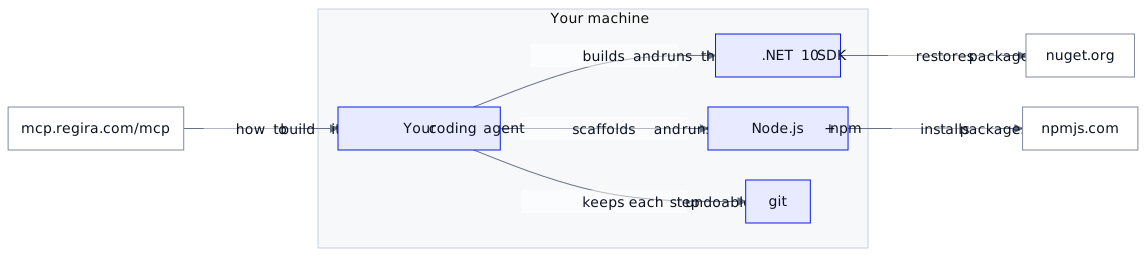
What you need, and why
| Tool | Version | What it is for |
|---|---|---|
| .NET SDK | 10.0 | Creating, building and running the ASP.NET Core API; restoring the Regira packages from nuget.org |
| Node.js with npm | 22.12 or later | Installing @regira/modules, running its scaffolder and the Vite dev server |
| git | any recent | A commit per step you accept, so a step you reject is one git checkout away |
| A coding agent | current | Writing the code and running the commands above |
The SPA runs on Vite 8, which needs Node 22.12 or later; the samples were built on Node 24, so an existing Node 22 does the job and a fresh install takes the current LTS.
An editor is optional, since the agent writes the files. To read them, VS Code and Rider work as they are; Visual Studio opens a .NET 10 project from version 2026 (18.0).
Windows
In PowerShell:
winget install --id Microsoft.DotNet.SDK.10 -e --source winget
winget install --id OpenJS.NodeJS.LTS -e --source winget
winget install --id Git.Git -e --source winget
Then close the terminal and open a new one, so it picks up the new PATH.
PowerShell starts npm through a script, npm.ps1, and Windows client editions run no scripts until you allow them. Allow local scripts for your own account, once:
Set-ExecutionPolicy -Scope CurrentUser RemoteSigned
Git for Windows brings Git Bash along, which Claude Code uses to run its shell commands.
macOS
With Homebrew:
brew install --cask dotnet-sdk
brew install git
The cask installs the latest SDK, which builds .NET 10 projects as well. Microsoft's .pkg installer from dotnet.microsoft.com is the alternative. Node follows below.
Linux
On Ubuntu 24.04 and later, the SDK and git come from the Ubuntu archive, with curl for the Node and agent installers below:
sudo apt-get update && sudo apt-get install -y dotnet-sdk-10.0 git curl
For other distributions, Microsoft's Linux install page names the package per distribution.
Node.js on macOS and Linux
nvm installs Node per user and lets you switch versions per project:
touch ~/.zshrc   # macOS only: gives nvm a zsh profile to add itself to
curl -o- https://raw.githubusercontent.com/nvm-sh/nvm/v0.40.8/install.sh | bash
\. "$HOME/.nvm/nvm.sh"
nvm install --lts
The first version nvm installs becomes the default, and every new terminal loads it.
Install the agent
Claude Code's native installer needs no administrator rights and keeps itself up to date:
# Windows, in PowerShell
irm https://claude.ai/install.ps1 | iex
# macOS, Linux and WSL
curl -fsSL https://claude.ai/install.sh | bash
On macOS and Linux the installer puts claude in ~/.local/bin, which a new terminal does not search until you add it, once:
echo 'export PATH="$HOME/.local/bin:$PATH"' >> ~/.zshrc    # macOS
echo 'export PATH="$HOME/.local/bin:$PATH"' >> ~/.bashrc   # Linux and WSL
Open a new terminal, run claude and sign in through the browser. Claude Code needs a Pro, Max, Team, Enterprise or Console account.
Any agent that speaks MCP over HTTP builds the same app:
| Agent | Install | Sign in with |
|---|---|---|
| OpenAI Codex | npm install -g @openai/codex |
a ChatGPT plan |
| Gemini CLI | npm install -g @google/gemini-cli |
a Google account |
| GitHub Copilot | VS Code with the GitHub Copilot extension | a GitHub Copilot plan |
| Cursor | the installer from cursor.com | a Cursor account |
Then point it at the Regira server: one file or one command per agent, in Connecting Your Coding Agent to a Documentation Server.
Check the machine
In a new terminal:
dotnet --list-sdks
node -v
npm -v
git --version
claude --version
| Command | Ready when it shows |
|---|---|
dotnet --list-sdks |
a line starting with 10.0. or higher |
node -v |
v22.12 or later |
npm -v |
a version; npm comes with Node |
git --version |
a version |
claude --version |
a version followed by (Claude Code) |
claude doctor goes further when the last line fails: it reports the install, its settings and a fix for each warning.
Prove it with a sample
A version number says a tool is installed. Running a Regira app says the machine also reaches nuget.org and npmjs.com, restores the packages and serves both halves. ShopMate, the app from the six-line brief, does that in a few minutes:
git clone https://github.com/Regira/Regira-Samples.git
cd Regira-Samples/ShopMate/backend/ShopMate.Api
dotnet run --launch-profile http
The first run restores the packages, then creates and seeds shopmate.db. The API listens on http://localhost:5871, with its API reference at /scalar.
In a second terminal, from the folder you cloned into:
cd Regira-Samples/ShopMate/frontend
npm install
npm run dev
Vite answers with Local: http://localhost:5872/. Open it: shopping lists with articles in them mean the machine is ready. Stop both with Ctrl+C. The app your agent builds starts with the same two commands, with --launch-profile https if its Vite proxy targets the API's HTTPS port, as the scaffold writes it.
If your setup differs
- WSL. Install everything inside the Linux distribution with the Linux commands, the agent included, and keep projects under your Linux home (
~/src) rather than/mnt/c: npm and the .NET build touch many small files, and those operations are far faster on the Linux file system. - A company package mirror. The agent restores from the feeds that
dotnet nuget list sourceandnpm config get registryshow. The Regira packages live on nuget.org and npmjs.com, so the mirror has to proxy both; the ShopMate run above is the quickest test. - Another Node version per project. With nvm,
nvm install 22next to the LTS andnvm use 22in that project's terminal. On Windows, nvm-windows does the same, installed instead of the winget Node package.
Docs: .NET install guides, Node.js downloads, Claude Code setup, and the samples at Regira/Regira-Samples.
Versions: written against the .NET 10 SDK, Node.js 24 (the LTS in September 2026), nvm 0.40.8 and the samples' Regira 6.4.0 packages; the @regira/modules 6.5.0 scaffold proxies /api to the API's HTTPS port.