Connecting Your Coding Agent to a Documentation Server
A coding agent that can reach a documentation server looks the framework up while it builds — guides, examples and type signatures, one piece at a time — instead of working from memory. Step 1 of the six-line brief connects Claude Code to the Regira server with one file; every other agent needs the same URL in its own place. Find yours below, copy the block, add one paragraph to your agent's instruction file, and skip the rest.
| Your agent | Config file | Key header |
|---|---|---|
| Claude Code | .mcp.json |
yes |
| Claude Desktop and claude.ai | Customize → Connectors | yes |
| OpenAI Codex | ~/.codex/config.toml |
yes |
| Gemini CLI | .gemini/settings.json |
yes |
| GitHub Copilot in VS Code | .mcp.json |
yes |
| Cursor | .cursor/mcp.json |
yes |
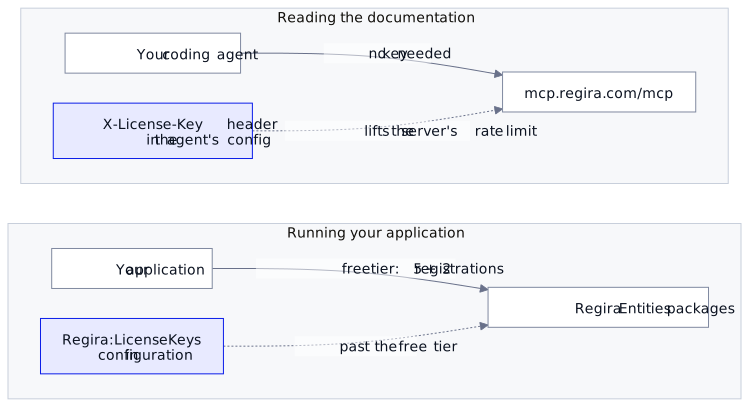
The server is https://mcp.regira.com/mcp, it speaks streamable HTTP, and it answers without a key. A key only lifts the server's own rate limit — see Adding a key.
Other situations: an application that already uses Regira, a domain over the free tier, no network.
Connect your agent
Claude Code
Save this as .mcp.json in the project folder:
{
  "mcpServers": {
    "regira": {
      "type": "http",
      "url": "https://mcp.regira.com/mcp"
    }
  }
}
Or let the CLI write it:
claude mcp add --transport http --scope project regira https://mcp.regira.com/mcp
The first session asks you to approve the server; claude mcp list shows it connected.
Claude Desktop and claude.ai
Remote servers are added as a custom connector: Customize → Connectors → + Add → Add custom connector, name regira, URL https://mcp.regira.com/mcp. On a Team or Enterprise plan an owner adds it once for everyone, under Organization settings → Connectors. claude_desktop_config.json only takes local servers, so it is not the place.
OpenAI Codex
Codex reads ~/.codex/config.toml, or .codex/config.toml in a trusted project:
[mcp_servers.regira]
url = "https://mcp.regira.com/mcp"
Gemini CLI
In .gemini/settings.json (project) or ~/.gemini/settings.json (user). Note httpUrl: in Gemini CLI, url means the older SSE transport.
{
  "mcpServers": {
    "regira": {
      "httpUrl": "https://mcp.regira.com/mcp"
    }
  }
}
Or from the command line:
gemini mcp add --transport http regira https://mcp.regira.com/mcp
GitHub Copilot in VS Code
VS Code reads the same .mcp.json as Claude Code: the file above, at the root of the workspace. GitHub Copilot CLI reads it too, so one committed file serves all three. The older .vscode/mcp.json, with its servers key, still works but is deprecated.
Cursor
Save as .cursor/mcp.json (project) or ~/.cursor/mcp.json (every project):
{
  "mcpServers": {
    "regira": {
      "url": "https://mcp.regira.com/mcp"
    }
  }
}
Check the connection
Whichever agent you use, one prompt proves the server answers:
Call the regira server's get_bootstrap_guide tool with heading "toc" and list the sections.
A list of setup steps means you are connected. An answer from memory means the agent did not load the server; restart it in the folder that holds the config.
Tell the agent to use it
Connected is not the same as consulted. With several servers connected, an agent picks one per question by its tool descriptions, and "filter and page a list" fits a general documentation server, or the agent's memory, as well as this one. One paragraph in the instruction file your agent reads every session settles it — CLAUDE.md for Claude Code, AGENTS.md for Codex, Copilot and Cursor, GEMINI.md for Gemini CLI, the project instructions in Claude Desktop:
## Regira
For anything involving Regira packages (`Regira.*` on NuGet, `@regira/modules` on npm), use the `regira` MCP server rather than memory or another documentation source, and follow the instructions it sends when it connects.
regira is the name you gave the server above. Keep the paragraph to which server and for what: how to read the server is in its own instructions, which change with it.
Adding a key
The header is X-License-Key. Read it from an environment variable, so the key stays out of a file you commit:
| Agent | Add to the regira entry |
|---|---|
| Claude Code, Copilot CLI | "headers": { "X-License-Key": "${REGIRA_KEY}" } |
| Claude Desktop and claude.ai | Request headers in the connector dialog: X-License-Key and the key itself |
| OpenAI Codex | env_http_headers = { "X-License-Key" = "REGIRA_KEY" } |
| Gemini CLI | "headers": { "X-License-Key": "$REGIRA_KEY" } |
| Cursor | "headers": { "X-License-Key": "${env:REGIRA_KEY}" } |
VS Code is the exception. Its chat sends the .mcp.json header as written, without expanding ${REGIRA_KEY}, so there the entry runs without a key. For a key in VS Code, use the deprecated .vscode/mcp.json instead: it prompts for the value.
{
  "inputs": [
    { "type": "promptString", "id": "regira-key", "description": "Regira license key", "password": true }
  ],
  "servers": {
    "regira": {
      "type": "http",
      "url": "https://mcp.regira.com/mcp",
      "headers": { "X-License-Key": "${input:regira-key}" }
    }
  }
}
The server's key is separate from the key your application uses, described below: one sits in the agent's config and lifts the server's rate limit, the other sits in your application's configuration and lifts the free tier.
An application that already uses Regira
The bootstrap guide maps PackageReference patterns to the guide to read (Regira.Entities*, Regira.IO.Storage*, Regira.Office.PDF*), so on an existing project the agent's first move is to read your .csproj, not to scaffold. Tell it what to change; it looks up the package it is about to touch.
A domain over the free tier
The free tier allows 5 simple + 2 complex entity registrations, and moving an entity from one bucket to the other frees nothing. Two changes do:
- Merge look-alike actors into one party with a role (the HelpDesk
Person; the docs call the pattern Stakeholders). - Make a child that is never loaded on its own an owned collection with
e.Related().
Past that, a paid key goes into configuration:
{
  "Regira": {
    "LicenseKeys": [ "<your key>" ]
  }
}
builder.Services.UseRegira(builder.Configuration); // before UseEntities
builder.Services.UseEntities<AppDbContext>(options => options.UseDefaults());
In development, dotnet user-secrets set "Regira:LicenseKeys:0" "<your key>" keeps it out of appsettings.json.
No network, or no MCP client
The server serves the same ai/*.md guides that ship inside the NuGet packages. A dotnet build extracts them next to the solution file:
MyApp.sln
.regira/
  instructions/
    entities.instructions.md
    entities.setup.md
    ...
The guides tell the agent to read from there when the server is absent. A file that is already there is never overwritten, so after a package upgrade delete the folder and build again, or the agent reads the guides of the version you started on. The front-end (Vue) guides are served by MCP only.
Docs: the Regira MCP server landing page, the Regira Entities framework, and paid keys at regira.com/licensing.