Sorting and Paging Without Surprises
Typed sort options, related data on request, and a page size no client can exceed

Once a list screen knows which rows it wants, it asks three more questions: in what order, with which related data, and how many at a time. Left to each endpoint, the answers drift: one screen can sort by a column and the next cannot, one list joins related rows it never shows, and nothing stops a client from asking for a million rows.
The basics decided which rows come back. This part adds the other three, and they are typed the same way as the filters: a vocabulary the client sends, translated once at registration, composed with the filters into the same single SQL statement.
Universal or Regira? A sort enum, a flags enum for related data and a page-size ceiling are plain C# over EF Core's ordering and Include — you can build them on any project. The registration that translates them once, the OrderOrThenBy helpers, the details default and the two paging options are Regira Entities.
The complex registration
Sorting and includes need the "complex" shape from part 1's endpoint table: the registration names a sort enum and an includes enum next to the search object. This is the sample's, in Vehicles/VehicleServiceConfiguration.cs; the two lambdas are filled in below:
services.For<Vehicle, VehicleSearchObject, VehicleSortBy, VehicleIncludes>(e =>
{
    e.AddFilter<VehicleFilteredQueryBuilder>();   // the builder from part 1
    e.SortBy(/* below */);
    e.Includes(/* below */);
});
The controller mirrors the same type list — VehiclesController : EntityControllerBase<Vehicle, VehicleSearchObject, VehicleSortBy, VehicleIncludes, VehicleDto, VehicleInputDto> — and that is what brings the POST endpoints along.
Sorting: an enum, repeatable
The client sends ?sortBy= values from an enum you define:
// bound from ?sortBy= (repeatable: ?sortBy=Brand&sortBy=Code)
public enum VehicleSortBy
{
    Default = 0,
    Code,
    CodeDesc,
    Model,
    ModelDesc,
    Brand,
    BrandDesc
}
A sort builder translates them:
e.SortBy((query, sortBy) => sortBy switch
{
    VehicleSortBy.Code => query.OrderOrThenBy(x => x.Code),
    VehicleSortBy.CodeDesc => query.OrderOrThenByDescending(x => x.Code),
    VehicleSortBy.Model => query.OrderOrThenBy(x => x.Model),
    VehicleSortBy.ModelDesc => query.OrderOrThenByDescending(x => x.Model),
    VehicleSortBy.Brand => query.OrderOrThenBy(x => x.Brand!.Title),
    VehicleSortBy.BrandDesc => query.OrderOrThenByDescending(x => x.Brand!.Title),
    _ => query.OrderOrThenBy(x => x.Id)
});
?sortBy= is repeatable, and that is where the one sharp edge lives. The builder runs once per requested value, so each arm must start the ordering or continue it — which is what OrderOrThenBy and OrderOrThenByDescending do. The hand-rolled query is IOrderedQueryable<T> check compiles, but an EF Core query passes it before any ordering exists, so the first sorted request throws.
curl "$URL/vehicles?sortBy=BrandDesc&sortBy=Code&includes=Brand"
# Volvo (TRK-001, TRK-002), Scania (TRK-003), Mercedes-Benz (VAN-001, VAN-002)
# - brand descending, code ascending within a brand
Includes: lean by default, fat on request
Related data is a flags enum the client asks for, so list payloads stay small until a screen needs more:
[Flags]
public enum VehicleIncludes
{
    None = 0, Brand = 1, VehicleType = 2, Interventions = 4,
    All = Brand | VehicleType | Interventions
}

e.Includes((query, includes) =>
{
    if (includes?.HasFlag(VehicleIncludes.Brand) == true)
        query = query.Include(x => x.Brand);
    if (includes?.HasFlag(VehicleIncludes.Interventions) == true)
        query = query.Include(x => x.Interventions);
    // ...
    return query;
});
curl "$URL/vehicles"                  # no brandTitle - nothing joined
curl "$URL/vehicles?includes=Brand"   # brandTitle: "Volvo", ...
curl "$URL/vehicles/1"                # everything - details always applies all includes
The last line is a deliberate default: Details(id) applies all registered includes, because a detail view wants the whole aggregate.
Where includes go wrong:
- An entity gets one
Includes(...)registration. A second one replaces the first, so compose everything in one lambda. - An unexpectedly empty nested collection is a missing or wrongly gated include, not a mapping bug — and never something to "fix" in a filter.
- A to-one that every list row shows, like the brand on a vehicle overview, gets no flag: include it unconditionally, one cheap join, and keep the flags for collections such as
Interventions. The sample gatesBrandonly to show the opt-in.
Paging: defaults in options, clamps at the boundary
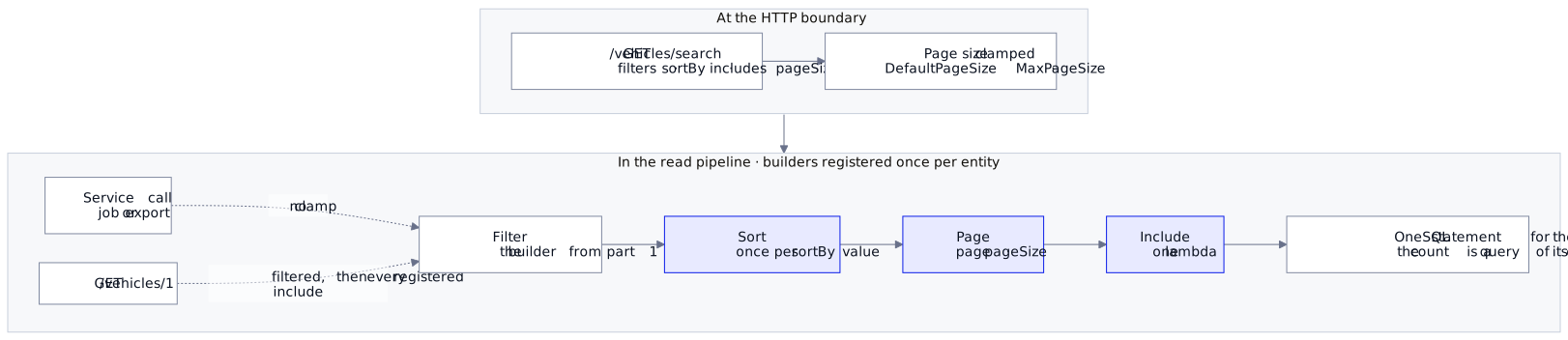
Two settings do the work: DefaultPageSize fills in when the request omits one, MaxPageSize caps what a request may ask for. The clamp is enforced once at the HTTP boundary, so a client that sends pageSize=0 to mean "everything" still gets at most MaxPageSize rows — while direct service-layer calls keep full control for jobs and exports.
curl "$URL/vehicles/search?pageSize=2&page=2"
# count 5, items TRK-003 + VAN-001   (page is 1-based; count = total matching rows)
Where each setting lands
- The overview list sends its filters, a sort and a page, and no
includes— no related rows are loaded, and the payload stays lean. - The detail view calls
GET /vehicles/{id}and gets every include without asking for one. - A job or export calls the service directly: no page-size clamp, full control.
Next, the rules every query obeys, whoever asks: Filters You Register Once and Cannot Forget.
Runnable: the series' API sample wires the typed sort vocabulary, the flags-enum includes and the paging ceiling — grab it and dotnet run.
Docs: Regira Entities — sorting, includes, paging options.