A Search Box That Finds Café When You Type Cafe
Accents, case and punctuation forgiven, with the work done once, on save

Someone types cafe and expects to find Café. Someone types mercedes and expects Mercedes-Benz. Someone types a vehicle code into a box that only searches titles. A search that compares raw text with raw text misses all three, and the usual repair — lower-casing and stripping every column while searching — runs those functions on every row of every search and still misses the accents.
The workable answer flips the timing: tidy the text once, when it is saved, and compare tidy with tidy when someone searches. This part shows both halves in the series' sample.
Universal or Regira? A normalized column filled on save and compared with LIKE on search is a pattern any EF Core project can build — the column is an ordinary string. The [Normalized] attribute, the save-time normalizer and the ?q= filter that parses the search string by the same rules come with UseDefaults() in Regira Entities, and IQKeywordHelper lets your own filters reuse them.
Save time: one attribute declares the column
Entities that want to be searchable declare a normalized column and name its sources:
public class Vehicle : IEntityWithSerial, IHasNormalizedContent, IArchivable
{
    // ...
    [MaxLength(256), Normalized(SourceProperties = [nameof(Model), nameof(Code)])]
    public string? NormalizedContent { get; set; }
}
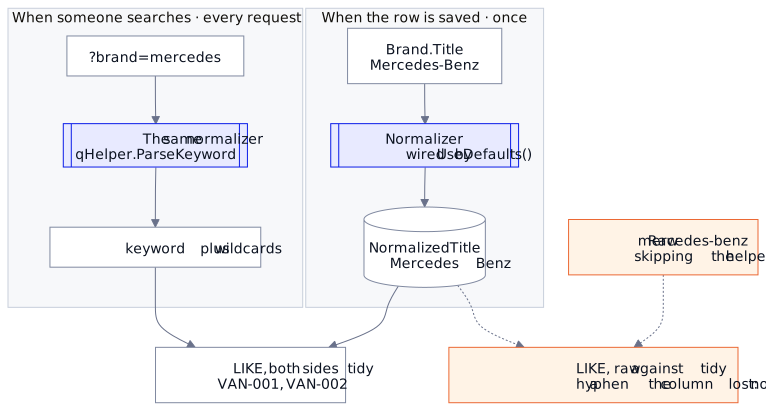
A save-time normalizer, wired by UseDefaults(), computes it: diacritics stripped, punctuation and whitespace collapsed, case preserved by default. You never write to it, and it is an ordinary string column, so a search reads it with a plain LIKE and no function around it. The sample's Brand uses the same attribute to feed NormalizedTitle from Title, and the seed comes out like this:
| column | from | stored |
|---|---|---|
Brand.NormalizedTitle |
Mercedes-Benz |
Mercedes Benz |
Vehicle.NormalizedContent |
FM Électrique, TRK-002 |
FM Electrique TRK 002 |
The accent and the hyphens are gone. Hold that thought.
Query time: the built-in ?q=
The free-text filter is a global filter, one that runs for every entity of a shape. For every entity with a NormalizedContent, it parses the search string with the same normalizer, producing a wildcard pattern per keyword, and applies each as a LIKE on the stored column:
var keywords = qHelper.Parse(so.Q);
foreach (var q in keywords)
    query = query.Where(x => EF.Functions.Like(x.NormalizedContent, q.QW));
Same treatment on both sides, so the input and the column meet in the middle:
curl "$URL/vehicles/search?q=fh16"       # count 1: TRK-001 (from Model "FH16 750")
curl "$URL/vehicles/search?q=sprinter"   # count 1: VAN-001
curl "$URL/vehicles/search?q=electrique" # count 1: TRK-002 (Model "FM Électrique")
Multiple keywords AND together. The accent is stripped on both sides, which is how electrique finds FM Électrique and cafe finds Café. Case is left to the database: most default collations ignore it (SQLite's LIKE does for ASCII), and if you can't rely on yours, set the normalizer's Transform to a fixed casing.
The same trick in your own filters
The Brand text filter from the basics is the branch skipped there, and it reads naturally now: normalize the input the way the column was normalized, through the injected IQKeywordHelper (registered by UseDefaults(), so there is nothing to add):
if (!string.IsNullOrWhiteSpace(so?.Brand))
{
    var brand = qHelper.ParseKeyword(so.Brand);
    query = query.Where(x => EF.Functions.Like(x.Brand!.NormalizedTitle!, brand.QW));
}
curl "$URL/vehicles?brand=mercedes" # VAN-001, VAN-002
That's the hyphenless search matching Mercedes-Benz, because both sides speak the normalized form. The helper exists to prevent one trap: pass the raw input to LIKE against a normalized column and searches silently match nothing — mercedes-benz would look for a hyphen the column no longer has.
EF.Functions.Like is standard, but providers differ (PostgreSQL wants ILike for guaranteed case-insensitivity) — swap the builder at registration rather than the call sites, one line per provider; see the docs.
Why not LOWER() and REPLACE() at query time? Wrapping the column in functions runs them on every row of every search, and stripping accents that way takes a REPLACE per character. Normalizing on save costs one column, runs once when the row is written, and leaves query time a plain LIKE. What it does not buy is an index seek: the built-in ?q= matches anywhere in the text (%word%), which reads every row. That is fine for the tables most list screens search; past a few hundred thousand rows, a prefix match (word%, which an ordinary index can serve) or the database's full-text index is the next step.
One part remains, and it answers the question every filter design eventually faces: Let Users Search for This or That.
Runnable: the series' API sample has the normalized columns and the ?q= endpoint against seeded data — grab it and dotnet run.
Docs: Regira Entities — normalizing, Q keyword helpers, global filters.