Quotes, Contracts and Letters from a Word Template
One set of interfaces, five backends, and a PDF at the end
Every company sends documents that follow a pattern: the quote, the order confirmation, the contract, the letter with the annual price change. The people who own their wording work in Word, they change a sentence every few months, and they do not want to file a ticket for it. The application's job is to take their file, fill in the customer, the lines and the totals, and hand back a PDF to send — and, on a good day, a Word file the sales rep can still tweak before it goes out.
The trap is doing that with a PDF library and a hard-coded layout. The document then belongs to the developers, and every wording change becomes a release. Keeping the template in Word keeps the document with its owners; the application only fills placeholders. Regira Office does the filling and the PDF for you, behind one set of interfaces over five backends, so whether you pay for a license, accept a free edition's size cap or run a Docker container instead is a registration line, not a rewrite.
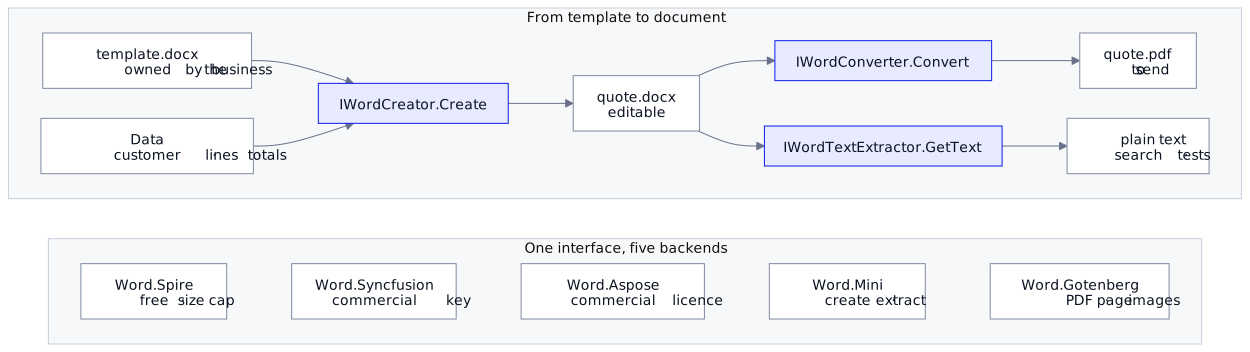
The template
A template is an ordinary Word file. Text placeholders are {{ tags }}; a repeating table row sits between two marker rows, rows whose only text is {{#each Lines}} or {{/each}}:
| # | Description | Qty | Unit price |
|---|---|---|---|
{{#each Lines}} |
|||
{{ row_number }} |
{{ Description }} |
{{ Quantity }} |
{{ UnitPrice }} |
{{/each}} |
The rows between the markers are written once per line, and the marker rows go. The older way to bind a table, its Alt Text title (Table Properties → Alt Text → Title), still works on the three full backends, but it hides the binding where a colleague restyling the table never looks; the markers are on the page.
The sample ships a template for a quote: a dozen tags, a table of lines, and two parts that appear only for some customers (below). It is plain Word: a colleague can open it, restyle it and add a paragraph, as long as the tags survive.
Fill, convert, read back
dotnet add package Regira.Office.Word.Spire --version 6.6.0
using Regira.IO.Abstractions;
using Regira.IO.Extensions;
using Regira.Office.Models;
using Regira.Office.Word.Abstractions;
using Regira.Office.Word.Models;

IWordService word = new Regira.Office.Word.Spire.WordService();

IMemoryFile docx = await word.Create(new WordTemplateInput
{
    Template = templateBytes.ToMemoryFile(),
    GlobalParameters = new Dictionary<string, object>
    {
        ["QuoteNumber"]  = quote.Number,
        ["CustomerName"] = quote.CustomerName,
        ["QuoteDate"]    = new DateTime(2026, 9, 25).ToString("d", culture),
        ["Total"]        = Money(subtotal - discount),
        // ...
    },
    CollectionParameters = new Dictionary<string, ICollection<IDictionary<string, object>>>
    {
        ["Lines"] = quote.Lines.Select(l => new Dictionary<string, object>
        {
            ["Description"] = l.Description,
            ["Quantity"]    = l.Quantity,
            ["UnitPrice"]   = Money(l.UnitPrice),
        } as IDictionary<string, object>).ToList()
    }
});

IMemoryFile pdf  = await word.Convert(new WordTemplateInput { Template = docx }, FileFormat.Pdf);
string      text = await word.GetText(new WordTemplateInput { Template = docx });
In that code (templateBytes, quote, culture, Money and the amounts are set up in the sample's Program.cs):
- You format the values. Anything that is not a string is printed with its plain
ToString(), so amounts and dates go in as text you formatted —Money(...)andToString("d", culture)above — and a quote innl-BEand one inen-GBdiffer in one line of C#, not in the template. - The rows between the markers repeat per item, and
{{ row_number }}counts from one. A collection the template has no loop for is skipped, so the same data fills a quote template that lists the lines and a letter template that does not. Convertfills a template too, so a PDF alone is one call with the parameters. Handing it the output ofCreate, as above, gives the.docxand the PDF from one fill, but that output is read as a template again: a typed value that leaves a paragraph or table cell holding only a block marker (next section), such as{{#if X}}, makesConvertthrow aFormatExceptionor drop text. Behind a label, as inNote: {{ Notes }}, typed text is harmless; a table cell has no room for one, so where users type the lines, convert with the parameters instead.Mergetakes filled documents the same way.
Run the sample (dotnet run, .NET 10 SDK) and it fills the template for two customers, writes each quote's .docx and .pdf to an out folder next to the binaries, and prints their text: every tag replaced, the numbered lines, the totals.
Parts that appear only when they apply
A quote is rarely one document: one customer negotiated a discount, another orders for the first time and pays a deposit. A copy of the template per variant drifts (three yes-or-no choices make eight copies), so the template marks those parts itself and the application supplies the facts.
A paragraph holding only {{#if Key}} opens a block, an optional {{else}} starts its alternative and {{/if}} closes it; {{#if !Key}} negates, and blocks nest. The sample's template, below the lines table:
{{#if DiscountPercent}}
Subtotal: {{ Subtotal }}
Discount {{ DiscountPercent }} %: - {{ Discount }}
{{/if}}
Total (excl. VAT): {{ Total }}
{{#if IsExistingCustomer}}
Payment: within 30 days of the invoice date.
{{else}}
Payment: 30 % with your order confirmation, the rest within 30 days of the invoice date.
{{/if}}
Note: {{ Notes }}
The conditions read the same parameters that fill the tags: ["DiscountPercent"] = quote.DiscountPercent, an int, and ["IsExistingCustomer"] = quote.IsExistingCustomer, a bool. A key holds when its GlobalParameters value is anything but null, false, zero, an empty or blank string or an empty collection, or when its CollectionParameters entry has rows — so {{#if Lines}} around a heading and its table drops both when there are none, where the table alone would stay with just its header. The branch that does not hold goes with everything in it, and the marker paragraphs always go. There are no comparisons: "above 10,000" is a flag computed in C#, ["IsLargeOrder"] = total > 10_000m, so the logic stays typed and tested and the template says only where.
The sample's two quotes, from the totals down:
===== out/Q-2026-0142.docx and .pdf
Subtotal: € 3.354,00
Discount 10 %: - € 335,40
Total (excl. VAT): € 3.018,60
Payment: within 30 days of the invoice date.
Note: Delivery within four weeks of your order confirmation.

===== out/Q-2026-0143.docx and .pdf
Total (excl. VAT): € 2.780,00
Payment: 30 % with your order confirmation, the rest within 30 days of the invoice date.
Note: Installation in week 45, as agreed.
Two things bite. A misspelled key is simply false: keys match regardless of case, but {{#if IsExistingCustomr}} finds nothing, and every customer is asked for a deposit. Values have the same trap, since the texts "false" and "0" are not blank and so hold: convert a form value to bool first. A test that reads GetText for each variant catches both. A malformed block throws a FormatException naming the paragraph: a marker sharing its paragraph with other text, an {{#if}} without its {{/if}}, or syntax the template does not know, such as {{else if X}}. Where users upload their own templates, a GetText of the template alone finds it at upload.
Which backend
| Package | Underneath | Create | Convert | Merge | Extract | License |
|---|---|---|---|---|---|---|
Word.Spire |
FreeSpire.Doc | ✓ | ✓ | ✓ | ✓ | free; 500 paragraphs or 25 tables per document, and a PDF stops after 3 pages |
Word.Syncfusion |
Syncfusion DocIO | ✓ (no ODT templates) | ✓ (not EPUB) | ✓ | ✓ | commercial key, or a community license; no size cap |
Word.Aspose |
Aspose.Words | ✓ | ✓ | ✓ | ✓ | commercial license; loads ODT, writes EPUB |
Word.Mini |
MiniWord | partial | — | — | text, images | Apache-2.0, no key, no cap |
Word.Gotenberg |
a Gotenberg server (LibreOffice) | — | PDF only; page images with a PDF renderer registered | — | — | MIT; a Docker container |
The two commercial backends take their key through the constructor, and both make a missing key visible: Syncfusion adds a trial banner to every document; Aspose refuses to construct the service, or, with AllowEvaluation, stamps an evaluation banner of its own and cuts long documents short. The banner is ordinary text in the output, so a test that checks it is absent is the test that the key works.
Three setups you are likely to have
An internal tool, short documents. Word.Spire, exactly as above. Its limits are per document, and the one you meet first is the PDF: the free edition converts the first three pages and appends a page advertising the paid one. A quote or a letter fits; a contract may not, and that is the point to move to a licensed backend.
Long documents, or a Syncfusion or Aspose license already in the building. Same code, one registration:
using Regira.Office.Word.Syncfusion;   // dotnet add package Regira.Office.Word.Syncfusion --version 6.6.0

builder.Services.AddSingleton(new SyncfusionWordConfig { LicenseKey = builder.Configuration["Syncfusion:LicenseKey"] });
builder.Services.AddTransient<IWordService, WordService>();
The key also resolves from the SYNCFUSION_LICENSE_KEY environment variable, so a host that already sets it needs no configuration; Aspose reads ASPOSE_WORDS_LICENSE or ASPOSE_WORDS_LICENSE_PATH the same way.
Linux containers, no vendor license. Word.Mini fills the template and a Gotenberg server produces the PDF:
dotnet add package Regira.Office.Word.Mini --version 6.6.0
dotnet add package Regira.Office.Word.Gotenberg --version 6.6.0
docker run --rm -p 3000:3000 gotenberg/gotenberg:8
using Regira.Office.Word.Gotenberg.DependencyInjection;

builder.Services.AddSingleton<IWordCreator, Regira.Office.Word.Mini.WordService>();
builder.Services.AddGotenbergWord(o => o.BaseUrl = builder.Configuration["Gotenberg:BaseUrl"]!);   // http://gotenberg:3000

// IWordConverter converter, injected: the template is rendered by Word.Mini before the upload
IMemoryFile pdf = await converter.Convert(new WordTemplateInput
{
    Template = templateBytes.ToMemoryFile(),
    GlobalParameters = new Dictionary<string, object> { ["CustomerName"] = customer.Name }
}, FileFormat.Pdf);
Loops and conditions carry over, marker rows and {{ row_number }} included: Word.Mini resolves them itself, before MiniWord renders, so the quote template fills the same way on this path. What does not carry over is anything bound by Alt Text: a table bound by its title stays unfilled, and an image replaces a {{ logo }} tag instead of a picture named by its Alt Text. And LibreOffice lays documents out slightly differently from Word: a font missing from the container is substituted, which moves line and page breaks, so install the fonts your templates use in the image.
No container at all. Regira.Office.PDF.MiniPdf converts Word.Mini's .docx to PDF in-process, with a layout engine of its own that is less faithful to Word than LibreOffice: fine for a plain letter, worth comparing side by side for a styled quote. Excel Reports as PDF Without Office on the Server shows it.
Alternatives
| Option | Fits when | What it costs |
|---|---|---|
By hand: DocumentFormat.OpenXml: WordprocessingDocument.Open(stream, true), replace each {{ tag }} in the Text elements, and clone the table row once per line |
a handful of fixed tags, and a PDF made elsewhere | Word splits a tag over several runs whenever someone edits around it, so a plain replace misses it; loops, conditions and the PDF are yours |
| A Word library used directly: Aspose.Words, Syncfusion DocIO or FreeSpire.Doc, each with a mail merge of its own | one vendor, chosen for good | that vendor's API throughout your code, so changing the license means rewriting the calls |
| HTML printed to PDF, by a headless browser or a Gotenberg server | the PDF is the only output, and the developers own the layout | no editable Word file for the exceptions, such as the contract with a clause struck out before signing, and every wording change is a release |
Docs: Regira Office — Word, and its conditional blocks. The Regira.Office.Word.* packages are Apache-2.0; Syncfusion and Aspose need their vendor's license.
Versions: loop blocks and marker rows are new in 6.6.0, on Word.Mini too, and so is Regira.Office.PDF.MiniPdf; through 6.5 a repeating table was bound by its Alt Text title. The sample pins Regira.Office.Word.Spire 6.6.0 and binds its table with marker rows. Conditional blocks are new in 6.5.0, and Convert, GetText and ToImages resolve them too, so a document with a paragraph holding only {{#if Key}} no longer passes through them unchanged. Word.Syncfusion 6.5.0 moves to Syncfusion 35, whose license keys are issued per major version: a key for 34 needs replacing. Word.Syncfusion, Word.Aspose and Word.Gotenberg are new in 6.3.0, where Word.Spire's WordManager and Word.Mini's WordCreator became WordService (the old names compile, marked obsolete) and Word.Mini learned tags with spaces inside the braces.